Read it as it is heard
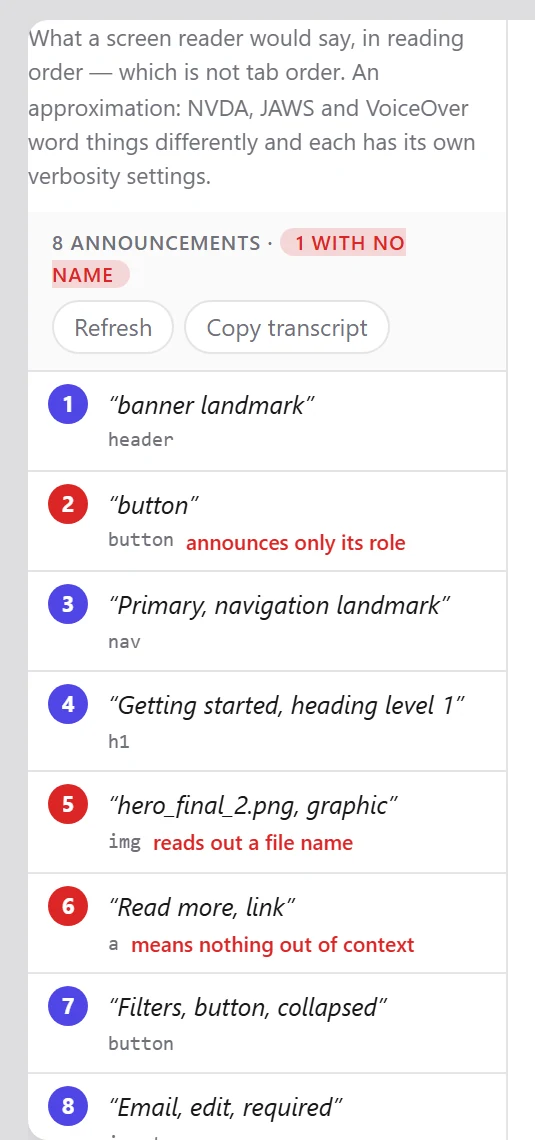
The transcript walks the page in reading order and writes out what each element contributes: its accessible name, its role, its state.
An icon button with no label looks perfectly reasonable in the Elements panel. Rendered as the single word “button”, it plainly is not.
Flags, in context
Rows that announce as nothing, announce a file name, or carry a role with no name are marked in place — next to the row above and below them, which is the only way to judge whether a heading actually reads as a heading.
- Click a row to highlight that element in the page.
- Copy the whole transcript, or one row’s selector.
- Landmark regions are named rather than read out in full.
Worth knowing: A transcript is a model of what a screen reader would say, derived from the accessibility tree. It is not a substitute for testing with a real screen reader, and it does not try to be.
Start with the page you are on
Install the extension, press F12 and open the Accessibility tab. No account, nothing to configure, and nothing leaves your machine.